Nederlands Deutsch (via google translate)
Introduction
In may 2010 I've got a new Oregon GPSr to replace my broken eTrex CS. This new GPSr was missing proximity functionality I used to calculate intersections of circles. Fortunately the Oregon is capable of running Wherigo's making it a programmable device. This prompted me to program a Wherigo to calculate intersections between circles. This Wherigo has grown to contain more functionality and has become Wherigo Geocaching Tools or WGT for short.
Attention: This is a complex program. Initialising may take some time. Also after updating for example the language or units it may take a while before all updates are processed. Please be patient and don't assume the cardridge has frozen.
Further the interface of the Oregon isn't as user friendly as I'd like it to be. For example the numeric keypad is missing a dot (.). A lot of people mistake the minus sign (-) for the dot. When entering numbers WGT accepts the minus sign as a dot. For example 116.88611 can be entered as 116-88611.
Main screen
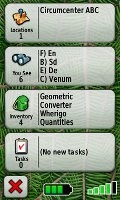 When you start WGT you will see on the main screen several items and have three characters in your inventory. The items work as points on witch the operations work. The characters are the objects that are capable of operations. Geometric operates on the points calculates amongst other things the intersections. Converter converts strings and values. Wherigo gives information about the GPS and controls the configuration options. Quantities converts physical quantity to several units of measurement. All these items en characters are described in more detail in the next paragraphs.
Points / items
A number of actions are possible on Points.
Properties
The properties of a point can be changed with this action. After selecting the properties action.
Name
The name of the point. The prefix, x), cannot be chanced.
Latitude
The latitude (North, South) or Y-coordinate of the point.
Longitude
The latitude (East, West) or X-coordinate of the point.
Radius
When the point is used as a circle, this is the radius of the circle. The center is defined by the latitude and longitude.
 Project
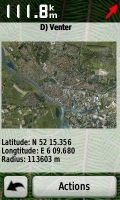
A point can be projected over a distance. When you select this action, you will be asked for a bearing. The distance is the radius of the circle you have set with the properties. When you project the projected waypoint will be in the first zone. The radius of this zone will be equal to the projected distance. After a projection, only the first zone is visible and an eventual previous calculated coordinate in the first zone will be overwritten. Also the relative projection with respect to the "previous" waypoint will put in the second zone.
Swap
You can swap points with either other points, zones or your current location. When swapping with a point or zone, the name, without prefix, location and radius are swapped. Prefix and image will not be swapped. When swapping with the current location, Here, the point will become the current location, the name the current date and time and the radius the current accuracy of your GPSr. Moving you to the position of the point will be implemented when the license for Transporter technology can be obtained from Starfleet.
Distances
When you select distances. You will be shown the distance between this point and the other points. And the direction of those points.
 Discworld
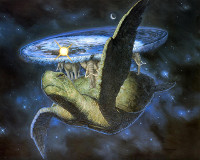
Calculate positions in a system inpred on the discworld books by Terry Prachett. The "previous" point is the hub. The distance you travel is equal to the radius of the point. You can select the directions: Hubward, Turnwise, Rimward and Widdershins
Staff coordinates
Especially for Saint Nicholas a specific coordinate system has been developed by JGeo. This is a relative coordinate system where distance and bearing are combined into one single number. For more information see the cache Al heen en al weer. When using staff coordinates, you will be asked for the value for "staf". The value for "roe" must be entered as radius first.

Wherigo
The Wherigo character gives you control and information about the cartridge.
GPS
Gives information about your current location, altitude and accuracy of the GPS. This function may be removed in future versions since most of these information can also be retrieved with the "Swap Here" functionality.
Environment
Gives you environment variables like the Platform, DeviceID, Device et cetera.
Language
Give you the opportunity to make WGT display a language you (don't) understand. Thanks to inkasso for the German translation.
Save
Saves the cartridge to and the settings so the next time you load WGT your settings will be restored. Most players will ask to save the cartridge when it is closed. This function is useful when player on a device that doesn't ask to save the cartridge or is buggy and frequently crashes. Remember Wherigo is still in βητα.
Unlock
Gives you the unlock code to unlock WGT on wherigo.com. When you select this action, the status also becomes completed. So instead of entering the unlock code, you can also upload the Save file.
Units
You can select your preferred units/format for Distance, Bearing and Coordinates. The unit you select will be used for input and display. For distances and bearings you can use any unit you like, as long as you put the symbol behind the value. For example 47 yd. If you omit the unit or use an unrecognised unit, the unit you have selected will be used.
Coordinates
Coordinates are special. Regardless of you select H DDD.DDDD, H DDD MM.MMM or H DDD MM SS.S, WGT will recognise the format. The output of coordinates is always in the by you selected format.
When you select Dutch Grid*, you have to enter the coordinates in Dutch Grid. Dutch grid is only valid for x in between -7000 and 300000 and y in between 289000 and 629000. If you enter a value outside this range, an asterisk will be added. For example: -50536 130922*.
*Rijksdriehoekscoördinaten or RD for short in Dutch.
Bearing
The bearing can also be entered in cardinal directions: N(orth), S(outh), E(ast) and W(est) and their subdivisions. For the Dutch, instead of an E an O, for Oost and a Z for Zuid instead of S can also be used. No more than three divisions (NNNW) will be displayed. You can enter more, just like degrees where you can enter 135.0884841043611, it will be used with that precision for calculation but when displayed it will be rounded. For example: when you enter NENNENEEEENNE it will be displayed as NE.
Converter
WGT can convert some common encodings.
ASCII / EBCDIC
Converts text to ASCII and EBCDIC values, and back. You can enter the ASCII/EBCDIC values either as decimal or as hexadecimal values. WGT will try to guess you intentions. Ambiguous codes will be interpreted as decimal. You can disambiguate the code by leaving out the spaces. For example: 5463 When you enter text you also get the ASCII string encoded as EBCDIC and vice versa. This is usually garbage.
Base
This function shows a number in different bases. The number can also be entered in different bases. First you will be asked for the base or radix of the number. If you enter an invalid value or no value at all the default base of 10 will be used.
For example: Enter radius 16, you can now enter values in base 16 or hexadecimal. Entering the number 4EB will convert it to bases 2 up until 36. The binary representation of this number is 10011101011, octal: 2353 and decimal: 1259.
Caesar
Caesar's cipher is one of the simplest and most widely known encryption techniques. It is a type of substitution cipher in which each letter in the plaintext is replaced by a letter some fixed number of positions down the alphabet. For example, with a shift of 3, A would be replaced by D, B would become E, and so on. This action will preform all 26 possible substitutions on the text you've entered.
Dynamic
This gives you the possibility to assign values to characters for the calculation of the value of texts. You can also enter a text. The value for that character will become the current dynamic value of that text. This procedure is known in The Netherlands as dynamisch stapeltellen.
Morse
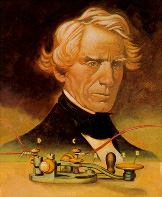 Encodes and decodes Morse code. A dot is represented by "." and "-" is used as dash. One or more spaces can be used as letter spacing, the short gap. The medium gap, between words, is represented by a slash /. If a message only contains Morse characters, the Morse code will be decoded. If not, the text will be encoded in Morse.
Roman
Encodes and decodes Roman numerals. When the text you've entered contains only digits, the number will be converted to Roman numerals. If it also contains characters the number is decoded back to decimal Arabic. Some remarks:
- When encoding to Roman, abbreviations like IV for 4 are used. You can enter also the ancient representation IIII for 4, in fact you can even use IIIII for 6.
- Although shortcuts MIM for 1999 disagree with the rule that letters may only precede letters of the same order, MIM will be converted to 1999. You can even push the subtractive principle to it's limit. For example by entering IIVVVXXXXC. When you want to convert 1999 to Roman numerals it will return the correct format of MCMXCIX.
- Large numbers are commonly represented by a bar over the characters, meaning the value of the letter will be multiplied by 1000. I = 1000, V = 5000, X = 10000, etc. Since most GPSr's cannot handle overlines, the notation with parentheses will be used. 90500 or IXD in Roman will be represented as (ix)D. You can also use the parenthesis to enter large Roman numerals.
Values
Shows the several values of a string. A=1, A=26, Vanity/SMS. As a bonus also the rot13 and mirror (A=Z, B=Y, C=X, etc.) conversions of that string will be shown. When a number has been entered, the factorisation in prime numbers will be calculated.
Viginère
Encodes and decodes the plaintext with the Viginère cipher. Only letters wil be used. Any character that is not a letter will be ignored in both the key as the plaintext. As a bonus also the encoding and deciphering with the Pocked Encoder is given.
Geometric
 In WGT the Earth is modeled as a sphere with a radius of 6371 km. A 'straight' line represents the shortest distance between two points P1 and P2. On a curved object this generalisation is called a geodesic. The geodesic on a sphere is a great circle.
Distances
The distance command gives the great circle distance from point A to point B. This is the shortest distance between these points. The bearing from A to B and from B to A is also given. Only for very small distances the difference between these bearings is 180°. The shortest distance between the line A-B* and point C will also be given. And the area of the triangle with vertices point A, B and C.
*The line A-B is the great circle that goes though points A and B.
Intersections
With the intersections command you can calculate the intersections between lines and circles. The result will be shown to you as one or two zones.
Lines
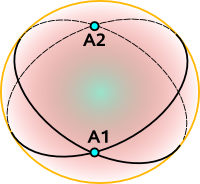 The lines are defined by points. The first line by point A and B, the second by point C and D. On a sphere any two lines intersect twice, these intersections are known as antipodal points and are on opposite sides of the sphere. WGT will give you the point closest to the four points that have defined both lines. The radius of the zone will be the maximum distance between the great circles.
If you want to calculate the intersections of lines that are defined by a single point and a bearing, project that point over a reasonable distance* and use this point as the second point defining the line.
*No to small to have for accuracy, not to big to confuse with intersection result will be returned. About 1000 km will usually do.
Circles
The circles are defined by points with a radius. The first circle by point A and the second by point B. When circles intersect each other, it will be usually in two points. You are presented the point nearest to your current location. Both points are available as zone in your locations. The radii of each zone is the distance between these two points.
Circle and Line
The line is defined by point A and point B. The circle by point C with it's radius. Just like the intersection of two circles, usually two points of intersection exists. And just like with the two circle are you presented the point nearest to your current location. Both points are available as zone in your locations. The radii of both zones is the distance between the line and the center of the circle.
Triangles
 With three points, a triangle can be constructed. There are hundreds of different constructions that find a special point associated with (and often inside) a triangle, satisfying some unique property. Prof. Clark Kimberling has made an extensive overview of these Triangle Centers. Often they are constructed by finding three lines associated in a symmetrical way with the three sides. WGT can calculate (or approximate) a few of the most commonly encountered constructions.
Incenter
 An angle bisector of a triangle is a straight line through a vertex which cuts the corresponding angle in half. The three angle bisectors intersect in a single point, the incenter, the center of the triangle's incircle. The incircle is the circle which lies inside the triangle and touches all three sides. It is the largest circle contained in the triangle. The radius of the zone is the radius of this circle.
Centroid
 A median of a triangle is a straight line through a vertex and the midpoint of the opposite side, and divides the triangle into two equal areas. The three medians intersect in a single point, the triangle's centroid or geometric barycenter. The centroid of a rigid triangular object (cut out of a thin sheet of uniform density) is also its center of mass: the object can be balanced on its centroid in a uniform gravitational field. The centroid cuts every median in the ratio 2:1, i.e. the distance between a vertex and the centroid is twice the distance between the centroid and the midpoint of the opposite side.
Circumcenter
 A perpendicular bisector of a side of a triangle is a straight line passing through the midpoint of the side and being perpendicular to it, i.e. forming a right angle with it. The three perpendicular bisectors meet in a single point, the triangle's circumcenter; this point is the center of the circumcircle, the circle passing through all three vertices. The diameter of this circle is the radius of the zone when calculating the circumcenter.
Orthocenter
 An altitude of a triangle is a straight line through a vertex and perpendicular to (i.e. forming a right angle with) the opposite side. This opposite side is called the base of the altitude, and the point where the altitude intersects the base (or its extension) is called the foot of the altitude. The length of the altitude is the distance between the base and the vertex. The three altitudes intersect in a single point, called the orthocenter of the triangle. The orthocenter lies inside the triangle if and only if the triangle is acute. The diameter of the resulting zone will be the current altitude according to your GPSr reading.
Snellius–Pothenot problem
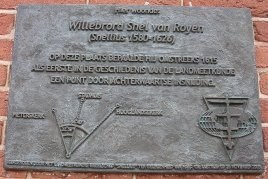
Given three known points A, B and C an observer at an unknown point P observes that the segment AB subtends an angle a and the segment BC subtends an angle b; the problem is to determine the position of the point P. The angle can be entered in the radius field. Where the circumference of the Earth is 360 degrees. Thus the radius is one radial and one minute one nautic mile. You can enter angles easy by adding deg to the number or switching the distance unit to Angle.
The Dutch astronomer and mathematician Willebrord_Snellius Was the first to solve this problem. He calculated the position of his house, by measuring the angles between the Pieterskerk, City Hall and Hooglandse Kerk. WGT is also capable of solving the problem: Determine the position of the point P given four known points A, B, C and D an observer at an unknown point P observes that the segment AB subtends an angle a and the segment CD subtends an angle c. So solve this problem, enter a small (< 2', 2 NM or about 3.7 km) angle.
Quantities Most physical quantities can be expressed in different units of measurements. First select the physical quantity to want to convert. Then enter that quantity in one unit. The result will be the same quantity in a lot of other units.
Since I still haven't found a reliable way to show special characters (high ASCII or Unicode), The degree symbol (°) will be left out when showing and entering temperatures. Also when temperature is expressed in Réaumur or Rømer, the accented characters will be replaced by regular charaters. Their symbols will become Re and Ro respectively.
Zones
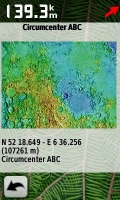 The result of a geometric calculation will be stored in a Zone. With a calculation also a radius is added. When you enter of leave the radius of the zone, you will get a warning.
Easter eggs
WGT contains some Easter eggs:
- X marks the spot.
- The base of WGT is the crossing of the runways of air base Gilze-Rijen.
- The default circles around each point and zone are intersecting this cross.
- What are you saying?
- When the names of the points, including the prefix, x), are pronounced the way the Dutch do. They sound like Dutch cities, towns and hamlets.
- The default location of the points is located at those places.
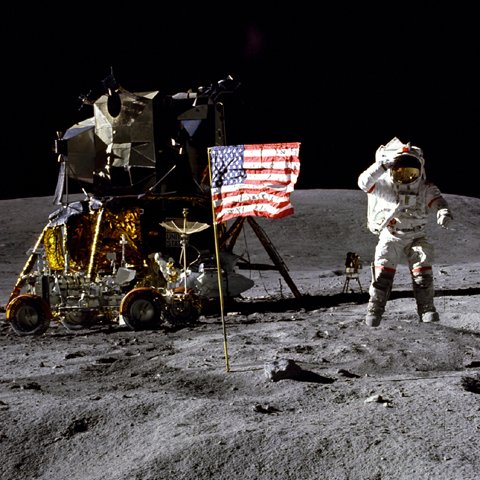
- The image is an areal photo of that place.
- Lunatic.
- The default locations of the zones are the landing places of Apollo 11 and 12.
- The images show these landing places.
- ????.
- ????.
- ????.
- ????.
- ????.
- ??????.
- ??????.
- ??????.
- ??????.
Banners
Some banners to put in your profile, signature and other places.
| Cache banner, regular size: |
 |
<a href="http://www.geocaching.com/seek/cache_details.aspx?guid=a765721f-bed0-4722-b576-7518a2847b36"><img src="http://img.geocaching.com/cache/bd512958-35d7-40dd-96e3-73621cf8a367.jpg" width="133" height="50" alt="Wherigo Geocaching Tools (GC2C308)" border="0" /></a> |
| Cache banner, small size: |
 |
<a href="http://www.geocaching.com/seek/cache_details.aspx?guid=a765721f-bed0-4722-b576-7518a2847b36"><img src="http://img.geocaching.com/cache/17d8f38b-490d-45c2-a75f-8c67982591be.jpg" width="50" height="50" alt="Wherigo Geocaching Tools (GC2C308)" border="0" /></a> |
| Wherigo banner, poster size: |
 |
<a href="http://www.wherigo.com/cartridge/details.aspx?CGUID=02168bb5-4c04-4a92-a8d5-f8d46dcf40c6"><img src="http://img.geocaching.com/cache/4ecfbf97-04dc-4661-be2d-8295e0da4235.jpg" width="120" height="150" alt="Wherigo Geocaching Tools" border="0" /></a> |
| Wherigo banner, regular size: |
 |
<a href="http://www.wherigo.com/cartridge/details.aspx?CGUID=02168bb5-4c04-4a92-a8d5-f8d46dcf40c6"><img src="http://img.geocaching.com/cache/719c478a-c30f-49c0-a61a-10ec96291b09.jpg" width="133" height="50" alt="Wherigo Geocaching Tools" border="0" /></a> |
| Wherigo banner, small size: |
 |
<a href="http://www.wherigo.com/cartridge/details.aspx?CGUID=02168bb5-4c04-4a92-a8d5-f8d46dcf40c6"><img src="http://img.geocaching.com/cache/be8d36db-8986-4580-abbf-22887bfe2a70.jpg" width="50" height="50" alt="Wherigo Geocaching Tools (GC2C308)" border="0" /></a> |
Awards
I'm proud to have been awarded with: |
GeoCheck
You can check your solution with GeoCheck: |
 |
|
 |
|
 |