How to use a Travel Bug®
The page is broken out into three sections, picking up a Travel Bug, dropping off a Travel Bug, and troubleshooting. The web site tries to mimic the adventures in the real world. Cache listings work like virtual containers for each Travel Bug listing.
Picking up a Travel Bug
A Travel Bug is usually a dog tag that is attached to a "hitchhiker," or an item that travels from place to place. If you found a Travel Bug the first thing you need to do is "grab" it online so you can add your own story to its journey. Refer to the FAQ for answers to other questions not covered on this page.
Step 1. Get the Tracking Number
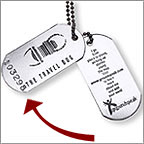 In order to log your find and "grab" the Travel Bug, you first need to locate the Bug's tracking number. The number is normally on the dog tag that is attached to the item, or, in the case of Geocoins, is stamped on the item somewhere. Make sure to write this number down before dropping the item in another cache. You'll need it to locate and "grab" the Bug online.
Step 2. Visit the Travel Bug Trackable's Page
Each Travel Bug has its own web page. To visit the Bug's page, either go to the cache page for the geocache where you found the Bug and look for the Trackable in the inventory list, or visit the Travel Bug home page and use the search tool. To use the search tool, enter the tracking number in the supplied box and click the search button.
Step 3. Found it? Log it!
Once you reach the Travel Bug listing, you will need to write a log to let the owner know that you found it. By logging the find you are also 'grabbing' the Travel Bug and putting it in your account's online inventory. This will ultimately allow you to drop the Travel Bug in another cache.
If the Travel Bug is listed as being in a cache, you will have two options, retrieving it or grabbing it. If you took it from the cache in which it is listed, choose to retrieve it. If you took the Travel Bug from elsewhere, choose to grab it. Both logs require the tracking number, so keep the tracking number handy for the Bug you plan to log.
Once you have successfully grabbed or retrieved the Travel Bug, it will remain in your online inventory until someone else grabs it from you or you place it in a cache.
You also have the option to 'Discover' a Travel Bug under the 'Found it? Log it!' menu. This log type is used when you see a Travel Bug in person, but are not planning to move it to another geocache. This log type will not add the Travel Bug in your trackable inventory.
Dropping off a Travel Bug
Once you log that you have retrieved or grabbed a Travel Bug, you can drop it into a cache. The cache listing acts as a virtual container allowing you to indicate that you have placed the Travel Bug in the physical cache.
If the Travel Bug has a goal, please try to follow the goal as best as you can. If the goal is to move the Travel Bug to the west coast, don't put the Travel Bug in a cache farther east.
Step 1. Visit the Cache Listing
Visit the cache listing for the cache in which you placed the Travel Bug.
If you already logged your find, don't panic! You can still post another log note.
Step 2. Visit the "log a cache" Page
As you normally log a find, click on the link to log the cache. You will need to log in first.
Step 3. Select the Travel Bug to drop off
After entering the text for your find, scroll down to see a list of Travel Bug Trackables in your inventory. Using the dropdown menu, select either "dropped off" to leave a Travel Bug in the cache, or "visited" to record a visit while still retaining possession of the Travel Bug. Once you are ready, click the button to submit your log.
 Troubleshooting
There were no Travel Bug Trackables listed on my "log a cache" page!
There are two possible reasons why the Travel Bug Trackables were not listed on your "log a cache" page.
-
Some cache types can't hold Trackables. This option will not show up for these cache listings.
-
Someone grabbed the Travel Bug from you before you were able to log it. Revisit the Travel Bug page to see if it was grabbed by someone else. If so, contact the user and see if you can grab it back to add your story to the Travel Bug Trackable's page. If you wait too long you may be unable to log your find if it has moved too far.
The Tracking Number doesn't work!
Is the tracking number you used the one that was stamped on the dog tag or geocoin?
Often, the Travel Bug reference number (aka "TB number") is confused with the tracking number. The "TB Number" is the reference code on each Travel Bug Trackable's page, which is the "safe" number to help users reference each Travel Bug without giving out the bug's actual tracking number. This will not work when picking up and grabbing Travel Bug Trackables.
If you send a request to http://www.geocaching.com/help for the tracking number and receive an automated response, the tracking number for the email message is not the Bug's tracking number.
If you lose the tracking number...
Try and contact the Travel Bug owner and ask them for the tracking number. As a policy, geocaching.com does not give out the tracking number to users who request it. The Travel Bug owner can ultimately decide whether to give it to you.