Please note: This is a new type of geocache as part of a CGHQ trial.
It is an AUGMENTED REALITY cache. See the note below.
Before you start please read through the cache page and look at and understand the images which show you how to navigate within the Metaverse. Make sure you can find your inventory and can swap between the 4 views listed. This will make it a much better experience for you.
-----
Geocachers play this game in many different ways. And all those ways are "right for them". Some enjoy puzzles, some love power trails, some do it alone, some love to be in a group, some chase high terain, some find one every day, some search only when on holiday. It doesn't matter which you are. All these ways and many others are good.
One of the goals of some geocachers is to find as many cache types as possible in one day.
We were not that surprised to find that those who live in the Augmented Reality (AR) may have similar goals. We recently met "The Numbers Woman" who is keen to get as many different types as she can preferably in one day. She loves her statistics. She knows that there are other AR characters in the area who have access to different cache types but she can't manage to get them herself. Your task is to visit as many of these others as you need to to get at least 5 different cache types. The Numbers Woman has promised to give you the coordinates to a real world cache if you can show her the required number of different cache icons. As experienced geocachers we are confident you will be able to do this.
There are 15 possible cache types to find in this experience. These are Traditional Cache, Multi Cache, Unknown Cache, Earthcache Virtual Cache, Letterbox Hybrid, Wherigo, Webcam, AR cache, Lab cache, Event, CITO, Mega, HQ, and the hardest one an APE Cache.
There are 21 experiences all put together as a group. 20 are geolocated which means you must be within 30 metres of the location of each experience for it to allow you to interact. When you have successfully interacted with it and earnt a cache type (if it has one) you will be given a cache icon
Some caches are easier to get than others. To get the final coordinates you will only need to find 5 of them. You must then revisit the Numbers Woman after you have found at least 5 caches. She can be found at the posted coordinates and later at a couple of other spots. She will tell you where. She will count the ones you have in your inventory and if you have 5 or more she will give you the final coordinates. Of course some of you may try to find more than 5 or even aim to find all 15.
The hardest to find is an Australian APE cache (not surprising!) . You will need to interact correctly with multiple experiences to get that one. When typing answers or questions please stick to no more than 3 words as the program may not handle long strings of words well. Pretty much everything you need to type can be done in one or two words only.
There is an Honour Board on this page for the first teams/groups of teams who manage to find all 15. The Numbers Girl will give you a one off code if you find 15. The code will change each time someone finds all the Geocache icons. If you do find 15 please screenshot your Inventory page showing the 15 before you talk to her. The Honour Board will continue to have team names added until the Trial Period is over. From that time, if AR_ caches continue, the new AR_ Challenge cache reward for finding all 15 will be an alternative reward for a great effort. GC7WC07 - AR_Challenge: Collect 15 different AR cache types.
Simple? 
Please read the game play instructions/advice below
Good luck and watch out for muggles!
-----
“This cache is part of an experiment that allows the use of Augmented Reality (AR) apps to find the cache. At the end of this experiment, Geocaching HQ will decide if this cache will be grandfathered or archived. Geocaching HQ reserves the right to archive this cache at any time if conditions change. If you have found this cache and would like to give feedback on your experience, please fill out this survey."
The cache is not at the posted coordinates but it is near to the best place to start, which is the Eastern end of Rundle Mall.. All the characters are located in the CBD within walking distance of the start (posted) location. Most of the locations are also shown as waypoints on this cache page although it can all be done from the Metaverse App which has its own map.
Please download the Metaverse App (for iOS or Android)) to be able to navigate to the final location. Please specify a username when signing up (we used our caching name) or else Metaverse will assign you a goofy one! Being able to log back in with your own ID also means you should not lose all your progress if things crash. Along the way you will be given cache icons. If the program crashes you will still retain these when you log back in provided you use the same ID.
Once the Metaverse App is on your mobile device, (and you have read the whole page!) click HERE or use the QR code below to load the program needed to start the cache game. The characters are all positioned along Rundle Mall or within a block or two. There are waypoints for these characters shown on the cache page. You should be able to open any character when you are within 30 metres of their location. Metaverse has a map view which shows you each geo-tagged experience. Experiences turn from blue to red when you are close enough to interact.
When you open an experience it remains at the exact spot and orientation that you opened it. If you need to move away a few metres to do a task or collect information, you need to go back to the original spot and orientation. You can zoom in and out carefully with a two finger pinch.
The experience should remember which caches you have already found even if it crashes. Each event, where you can get a cache icon, should make it very obvious when you have the new cache icon added to your inventory. If you try to redo one it should tell you you already have this cache type - which may be a way to check if you are not sure.
If you some reason you want to start all over again there is an experience to drop all the caches you have found. This one is not geotagged but it is on the group page and should only be used to reset everything to zero.
The experiences are all in a GROUP. Once you open the group all of the experiences will be visible but you can only start each one when you are within 30 metres. Start at the posted coordinates with The Numbers Girl.
Selecting experiences and Navigating using the Metaverse app:
You will start on a screen with all experiences listed but most grayed out. Scroll up and down to access them all.
Group Experiences views before and after scrolling:
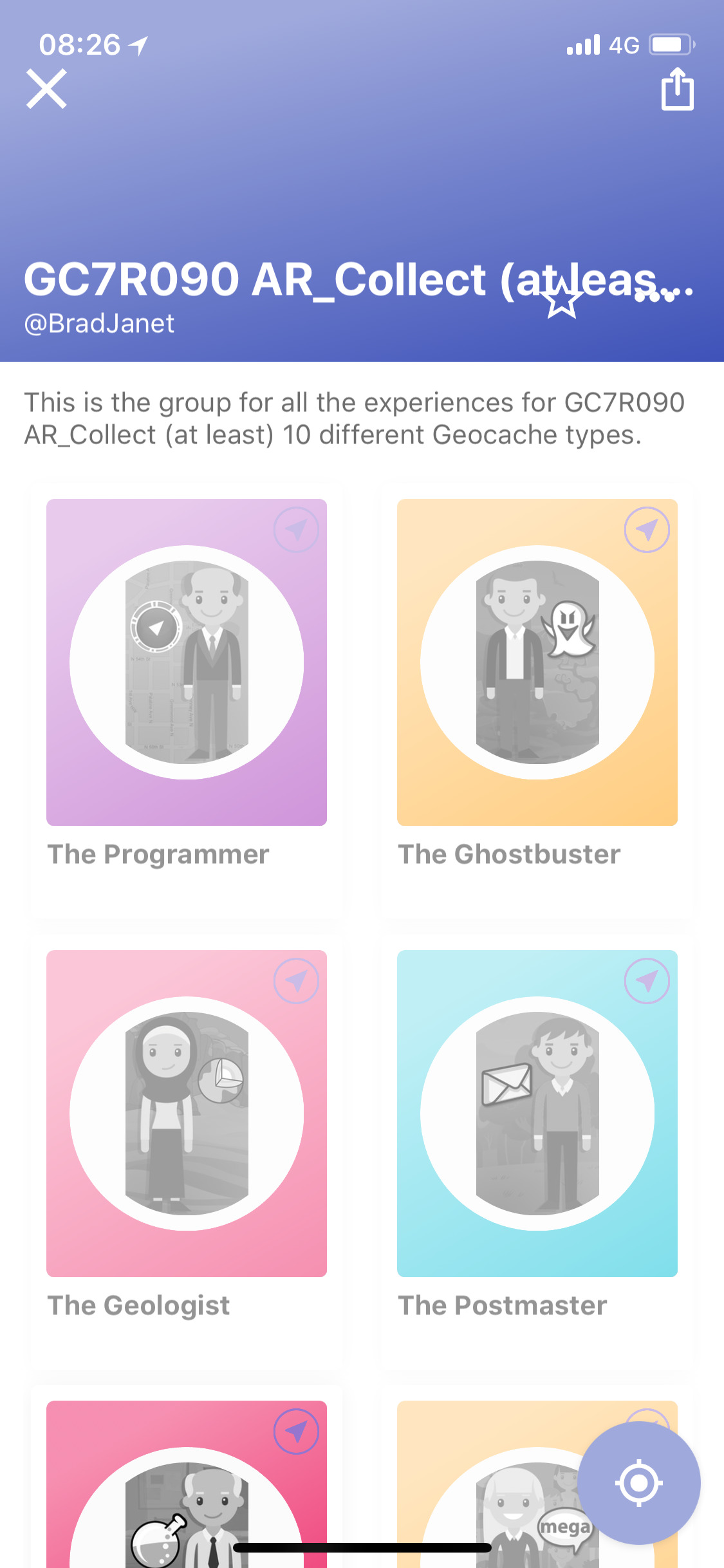
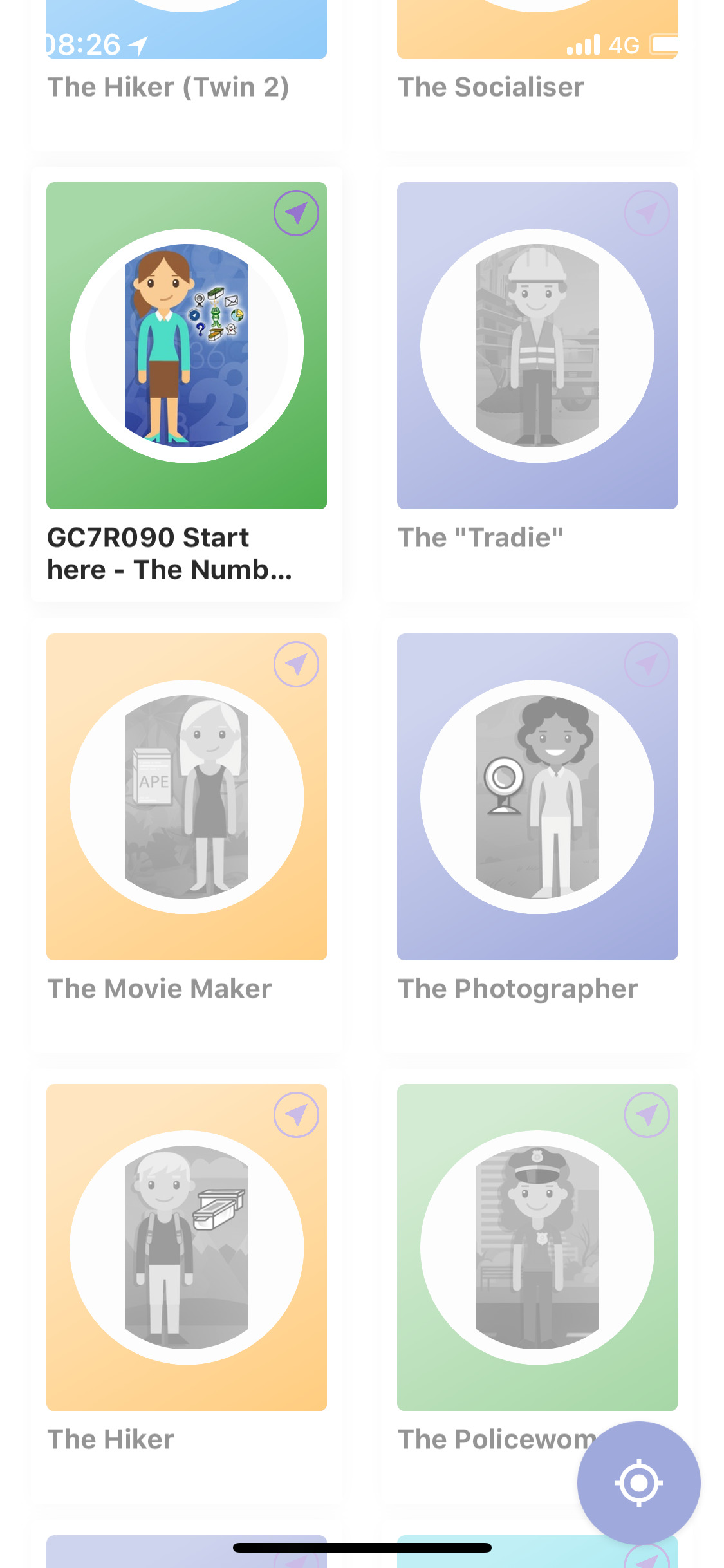
In Group view touch the round target icon in the lower right corner to switch to map mode. In map mode, any experiences you are close enough to react to will have their blue dot turn red. Then you can open them. You can also open them from Group view when you are close enough. In the images above the experience GC7R090 Start here - The Numbers Girl is not grayed out and it can be opened. This is an iOS view. The greying out seems a little different and perhaps less obvious in Android. Using either, the experience will open if you are close enough and will not if you are not.
To toggle back out of map, touch the screen anywhere outside the map for iOS (Apple) or hit the return key for Android.
Here is a map view with Rundle Mall running up and to the right.
Map/Navigate View:
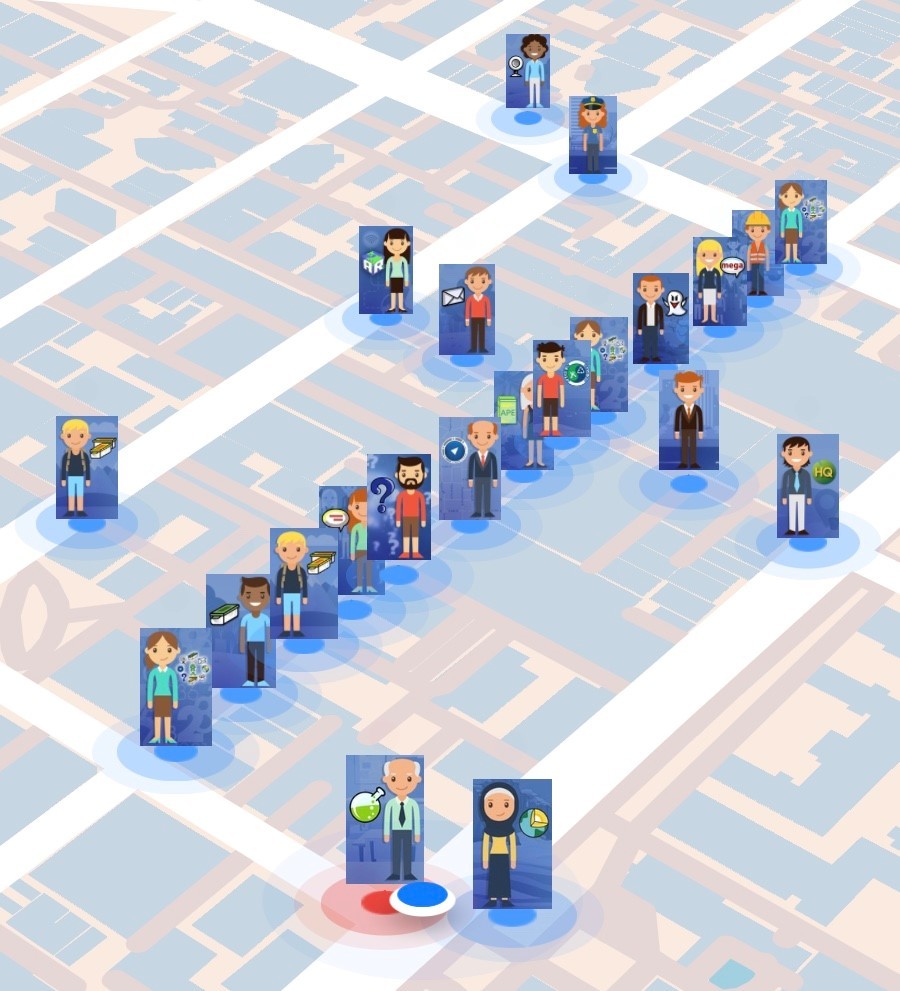
The player location is marked by the blue dot with a white border visible at the bottom middle of the image. You can see a nearby image of an experience (a man with a Labcache Icon - He is The Professor). He has a red dot meaning the player is close enough to interact with his experience. The rest of the images have blue dots meaning the player is still too far away to interact with them yet. The Numbers Girl you need to start with is visible at the eastern end of Rundle Mall at the posted coordinates.
When you finish an experience it should close. It may ask you if you wish to share it. I suggest choosing no but it doesn't really matter. You can then move on to the next experience you choose. You will need to walk to get close to it.
Profile View (showing inventory Button): and Inventory View:
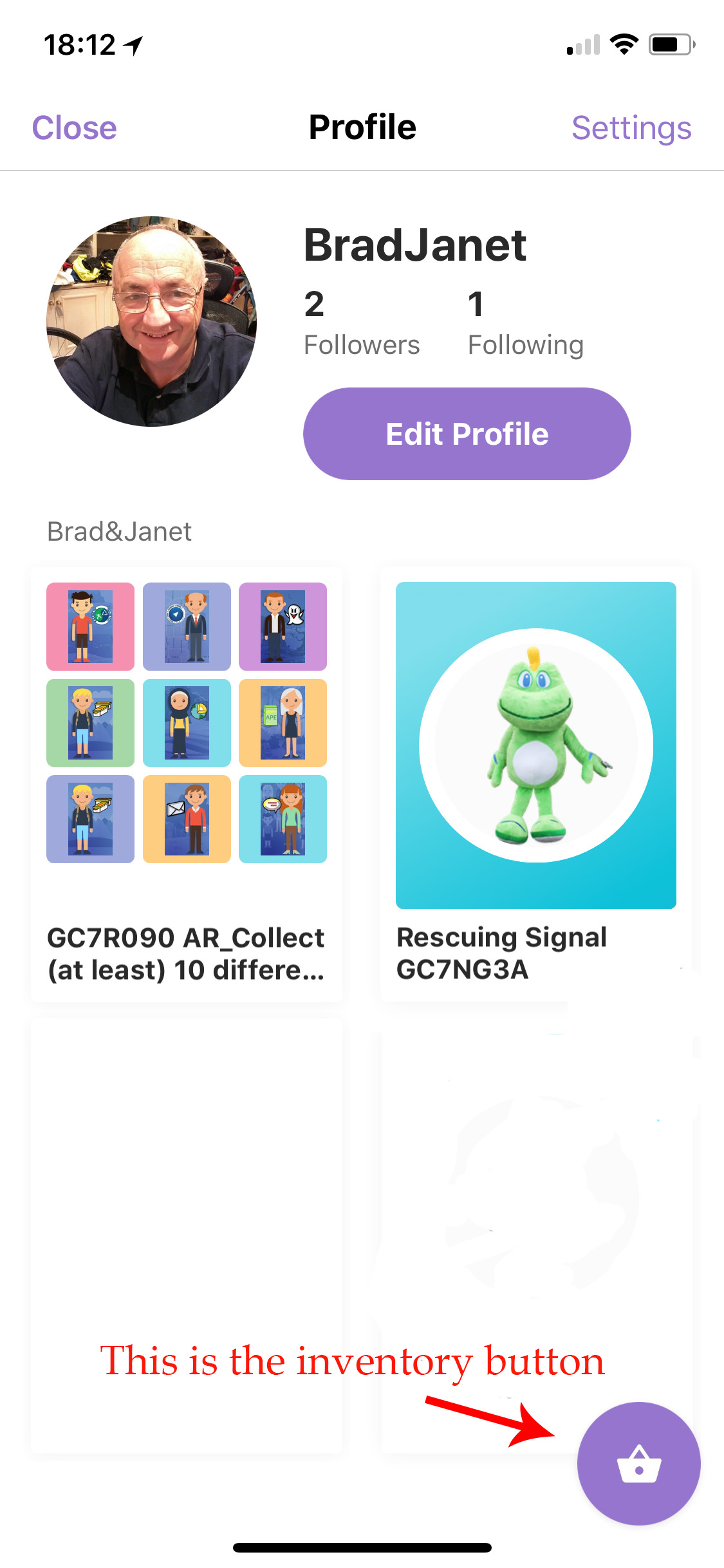
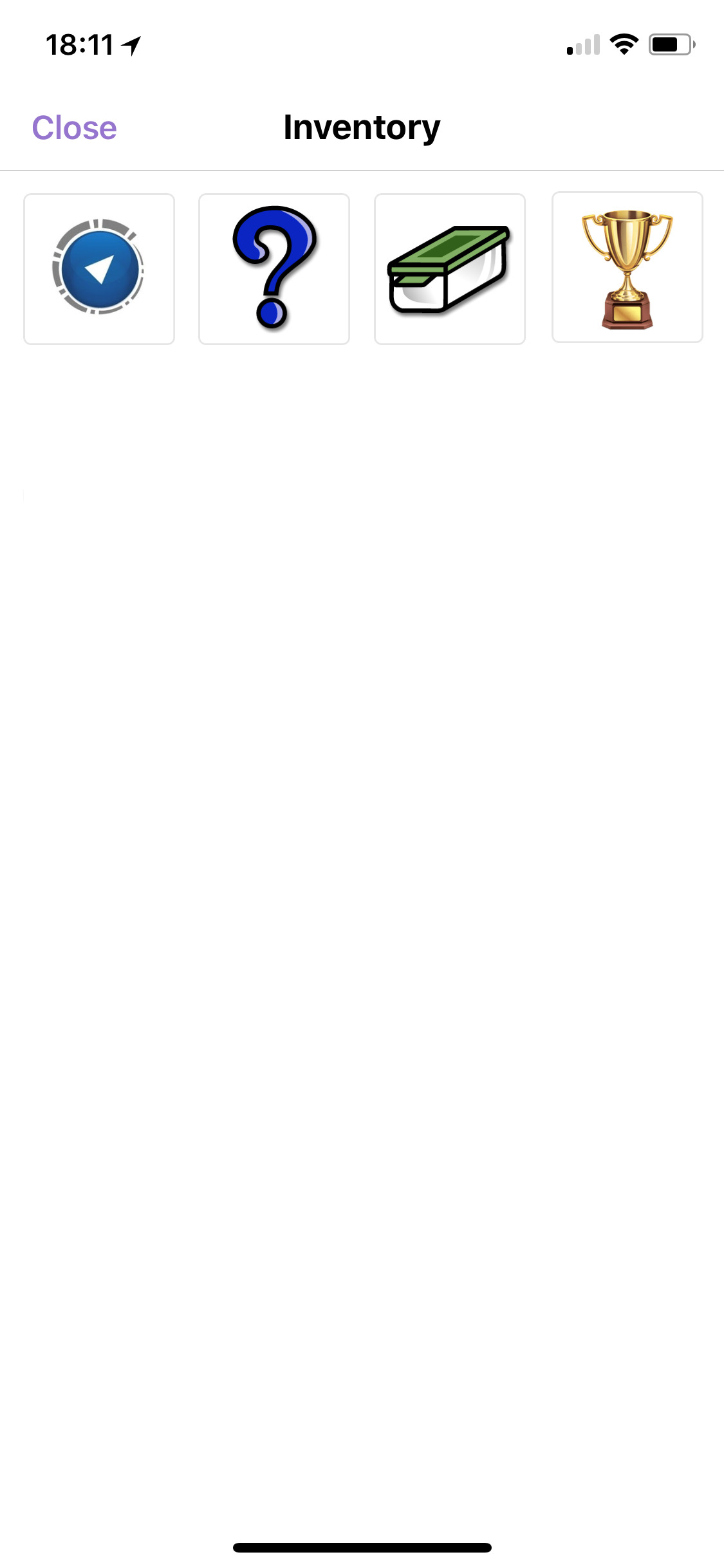
You can also check your inventory at any time to see what caches you have found.
To do this close the group (press the X at top left in the Group Experiences view) which should open your profile as above. We have labelled the little purple crown icon at the bottom right which is the inventory icon. Press this and it will show what you are carrying as in the second image. It may include items from previous Metaverse experiences you have played. In the example shown there are 3 Geocache Icons from this Group Experience (Wherigo, Mystery, and Traditional). There is also a Gold Cup from another Experience. Any other items do not matter. You will then need to exit inventory (press close) and restart the group. You will still have all your items.
Here are four ways to start the Group experiences:
1: Click HERE
2: Scan the QR code below to start the app
3: Screen shot the QR code and save it (crop it to just the code if you can). Open metaverse app and select scan code. Then choose the image library option to choose the saved QR image
4: Open metaverse app and search for GC7R090 AR. You will find two groups as they can't be removed or renamed . Use the one called "GC7R090 AR_Collect (at least) 10 different Geocache types". Note: Although it says 10 you only need to find 5. Of course more finds equals more fun!
And now there is a new cache just for people who have found all 15.
GC7WC07 - AR_Challenge: Collect 15 different AR cache types.

The waypoints listed here on the cache page are not essential but they may help you to more easily navigate when you reach those points in the game program or more likely they may help you plan in advance. They show you the extent of the area to be covered while playing. They largely match the Metaverse map image above.
While you can swap between GC and the Metaverse on one smartphone, it may be easier to run a smartphone for the app and a GPSr (or second smartphone) to navigate. However the Metaverse navigate feature is pretty good when you are within walking distance. Also as the GPSr in the smartphone can "hunt" in the city, it may be good to have the Metaverse map going to get you close enough to each experience. During testing sometimes we stayed still and waited as the GPSr phone function hunted and settled down. All testing was successfully done with just a smartphone mainly using map mode.
While these experiences have been all tested a number of times there may still be issues. Hopefully the fact you only need to find five will help. Please be gentle/constructive in your criticism as we are all trying to learn this new App.
The solution checker will enable you to easily record the final coordinates when you reach that point in the game program. Or you can take a screen shot.
If you find some caches but not all, you can go back any time later to try to find the rest to get to 5 or even 15 (assuming you use the same login code)
Please be aware that photos taken within the Metaverse app (2 AR experiences - Virtual and Webcam) are stored on a Metaverse Wall which Brad&Janet can see. We can delete them after the fact if you ask us to do so. No photo absolutely needs to have you in it. But a photo of a keyboard or your computer screen which is meant to be something else in the CBD may not be too convincing regarding your physical presence in the CBD at the time.
In your online log it would be great if you could please let us know which cache types you successfully found. Additionally we would like it if you upload any photos you took, and maybe a screenshot of your inventory of cache icons, but this is not essential.
A big thank you and credit goes to Cache_ISM for his creation and design of the character images and the AR Cache icon.
Honour Roll: Teams who found all 15 Geocache Types during the AR trial period:
- 1st: AllisterW and Rod81W
- 2nd: Hurtle
- 3rd: Doctor Owl, Brisal5, and SA Sewer Rats
- 4th: *Cache_or_Check*
- 5th: JJ52
- 6th: jesswrigley and Davidwazza
- 7th: gridge98
- 8th: Moneydork
- 9th: Freddo
- 10th: Michells&hound
- 11th: RideTheGeoWalrus
- 12th: 3LG and hevwalker
- 13th: KNGT
- 14th: I_J
- 15th:
Aug 23: There is now an extra cache just for people who have found all 15 types.
GC7WC07 - AR_Challenge: Collect 15 different AR cache types.