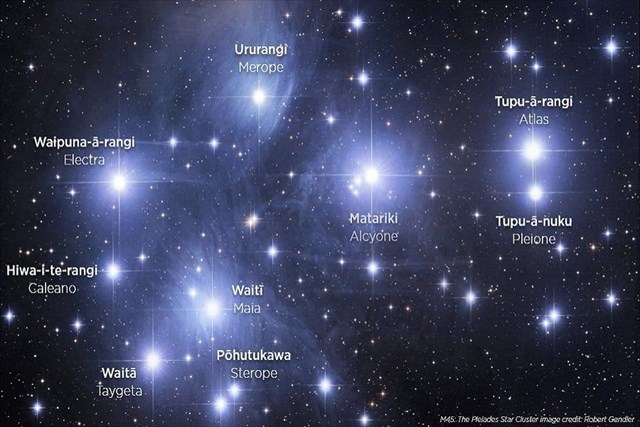
Within the Matariki star cluster are nine stars.
Around the world it is known by different names:
- Pleiades (ancient Greek)
- Seven Sisters (English)
- Freyja’s hens (Norse/Vikings)
- Subaru (Japan) "Gathered Together"
- Makali‘i (Hawaii) "Eyes of Royalty"
- Mao or Hairy Head of the White Tiger of the West (China)
- Krittika (India)
Tupu-ā-rangi (Greek: Atlas) is associated with everything that grows up in the trees (e.g. fruits, berries, and birds).
The image below gives the positions and name of each star specific to the southern hemisphere.
Images of this star cluster (Pleiades or Seven Sisters) from the northern hemisphere perspective, has the stars switched the other way around.
THIS IS A REVERSE WHERIGO
What is a Reverse Wherigo?
It is a type of Wherigo that tells you the distance, but NOT the bearing/direction to the geocache.
You can start playing this Reverse Wherigo from anywhere, but the final geocache is within 3.2km of the starting co-ordinates listed on this cache page.
For those that would like to attempt to play the Reverse Wherigo, you will need download an app to your phone that can run Wherigo cartridges:
- Android: WhereYouGo – Play store
- iOS: Wherigo - Mac App store
HOW TO PLAY
Log into wherigo.com using the same name and password that you use for geocaching.
Download the Wherigo cartridge (use the PC format) to your phone.
This Wherigo uses The Reverse Cache - beta a cartridge created by Waldmeister and can be found HERE
Play the game via the cartridge in the Wherigo app:
- Start
- Choose cartridge = The Reverse Cache - beta
- New Game
- Start
- type in = en (Answer)
- metres (Answer)
- OK
- Play (Answer)
- OK
- Just above the answer box tap on the screen, a keyboard will appear
- Enter XXXXXX code (Answer)
- Enter XXXXXX code (Answer)
- Enter XXXXXX code (Answer)
- It will ask is it right?
- Right (Answer)
- Cancel: given two options
- OK (Answer)
- OK
- Inventory are 3 options, choose:
- Reverse Cache Box
- Test GPS signal = wait for it to confirm
- OK
- Display distance
- The geocache is XXX kilometres away
- OK
- Walk or drive to a new location
- Display distance
- The geocache is XXX kilometres away
TIPS: You can find the cache as described above, but another cacher (Gorby) suggested another method which involves using CGEO to create a waypoint (co-ordinates) at your current location, write them down with the distance from the Wherigo screen.
Move to another location create another waypoint and check the distance, it will go down only if you are going in the right direction.
With the two sets of numbers use the online tool HERE to calculate the intersection of circles.
Once you get very close to the final geocache, the "Reverse Cache Box" will give you the final co-ordinates for the cache, you will need to go back in the Wherigo app to find this list of options.
When you start the Wherigo cartridge you will be asked for some code numbers:
813223
895563
751214
It is hoped that you will attempt to play the Wherigo, but because this is old technology and modern phones may not let you download the Wherigo app, an alternative way to play the game is to use a online solver.
The solver means you do not need to download the Reverse Wherigo cartridge to your phone, and will give the exact co-ordinates which you will then need to update on the cache page.
It uses the three code numbers above, and a link to the online solver can be found by clicking below:
Reverse Wherigo Decoder: Waldmeister