Personalize your geocaching with Attribute Search
Searching by attributes is now available to Premium members in the Advanced Search filters on the Geocaching® app and on Geocaching.com.
Filtering by attributes lets you find caches that match your plans, abilities, and desired experience. Now you can focus on the best caches for you!
With the addition of four new attributes, there are now a total of 70 attributes to help you refine your Premium Search. From “Dogs allowed,” to “Recommended for kids,” “Boat required,” or “Takes less than one hour,” Attribute Search lets you find the caches that matter to you.
Attribute Search in the Geocaching® app
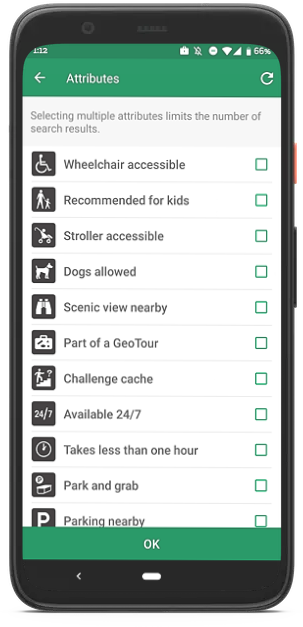
We took the 26 most popular attributes, added three new ones, and made them available in the Premium Search filters in the app. Select the filter icon on the map view and expand attributes to search. Finding the best caches for you is now an easy search on the go.
Attribute Search on Geocaching.com
Planning your next caching trip has become more personal. You can now select any of the 70 available attributes in the Premium Search filters on the geocaching homepage and geocaching map. Expand the filter panel to select the desired attributes.
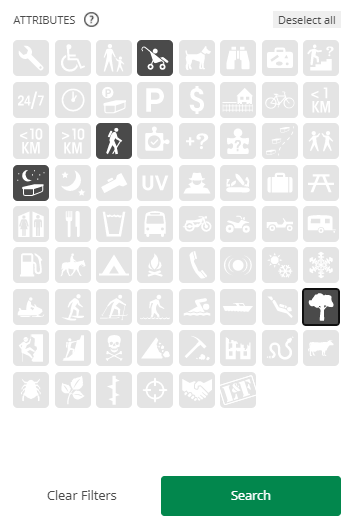
Once you hit Search, you can add the resulting caches to a List. Lists automatically sync with your Geocaching® app. If you know you could be out of cellphone range, make sure to download your Lists for offline use before heading out.
Note to cache owners
You can identify attributes for your geocache before submitting a cache listing or you can add attributes after publication by editing your cache.
Frequently asked questions:
Why doesn’t my Attribute Search return any caches?
The number of search results will depend on the caches available in your area that include the attributes you have selected. If you select two or more attributes, only caches with all selected attributes will be displayed. If you select the attributes “Boat required” and “Night cache”, you might not see any search results if there are no night caches on islands in your area.
You may select up to ten attributes on Geocaching.com or as many as you like in the Geocaching® app. Please note that only caches with all selected attributes will be displayed in your search results.
How can I exclude attributes from my search?
Attribute Search looks for geocaches that include certain attributes. If you are looking to exclude attributes from your search, let’s say you don’t have a UV light and want to exclude night caches that require one, you can use a Pocket Query.
How can I include attributes in my search in their negative state?
Attribute Search only looks for geocaches with attributes in their positive state. You can search for attributes in their negative state using a Pocket Query.
What attributes are you excited to search for most? Let us know in the comments!