[music]
00:14 Chris Ronan: Hello, everybody. Welcome to Inside Geocaching HQ, the podcast about the goings-on at Geocaching HQ in Seattle. My name is Chris Ronan. My username is Rock Chalk. I am one of the 80 or so lackeys who works at HQ in Seattle. And of course, these days we are working remotely now for about two months, all of the lackeys are, so this is more of a podcast about HQ rather than being from HQ. But today, it is my pleasure to talk with Daniel Gruici, who is the Mobile Engineering Lead at HQ. He has had some interesting positions before he came here, and has had some interesting role since he has been at HQ. So we enjoyed talking about those things. So let’s get right to it. Me and Daniel Gruici.
[music]
01:15 CR: Daniel, thank you for taking some time out and talking about any number of… You don’t know what we’re gonna talk about today, it’s wide open. So thank you for taking the leap with me.
01:26 Daniel Gruici: Hey, thanks for having me, I’m really excited to be here.
01:29 CR: So, mobile engineering lead, let’s start with that. What does that mean? How would you describe what you do to a stranger?
01:37 DG: So, it’s evolved since I started, but my main thing is making sure everybody on the team feels like they’re growing, removing roadblocks that they may have, that I can help solve, and trying to be as much of a subject matter expert as I can for both the platforms. But my main thing and the thing that I enjoy the most is just making sure everybody feels like they’re growing and moving forward in their careers.
02:03 CR: What originally brought you to HQ? Because I know this is one of a few roles that you’ve had here. What was that that first brought you to HQ?
02:11 DG: So, back when I was in Arizona, I was looking for leadership positions. It’s something I’ve kind of fallen into and enjoyed each time that I’ve been anywhere, actually. And the job pool in Arizona was looking for more development, they were looking for more people who wanted to do cross-platform solutions and things like that, and I’m not extremely interested in it, it’s still a emerging market down there, so different problems that caused me to look outside.
02:41 DG: My wife actually suggested, “Hey, if we’re looking outside, why not Washington?” I was like, “Okay.” And then when I found that Geocaching was hiring, I also found out that D-Rux, one of my friends that I met in college, was working there. I was like, “Well, alright.” So I reached out and I’m like, “Tell me about working there,” and he’s like, “It’s great working here.” “Well, that seals it. Okay.” [chuckle] So, applied, fun fact, I believe, LinkedIn and the parent company for Victoria’s Secret, those are the three in the running. And then as soon as I got the offer, which came real quick and I was so stoked, I was like, “Yeah, no, we’re done, we’re going to Washington. We’re going to Geocaching, it’s gonna be great.”
03:24 CR: That is quite a trio of contenders for your services, quite a range of offerings there. And I would think HQ was probably by far the smallest of those three; those other two are pretty well-known international conglomerates. What was it about HQ that really appealed to you?
03:47 DG: The one who sold me on it the most was actually our previous product owner, Ben, who I’m sure everybody knows. He and I had a really good conversation about how the product team flow works and what he looks for and what he was interested in and how we put our work product together, and that was something I was really looking for, because it’s very difficult to find somebody who both cares about your customer, and then also brings that all the way through to the developers, so that we feel the same way and then moves the story through so that we can get work done. And then when I got to do my in-person interview, the other Android developers were very welcoming. I somehow impressed them as well ’cause they’re talented folks. And all of us had just… It felt like a perfect fit, when I finally got to be on site, even though I came in my shirt and tie, as I do…
[laughter]
04:46 DG: Don’t worry, the tie had geometry proofs, it was totally legit and very casual. [laughter] Even with that, I still felt like… It still felt like I’d fit in. It felt like I could be an asset for the team, and that was the feedback I got too. It was actually something really nice was them saying, “The first person that came in here, he didn’t just stomp in and say ‘Well, this is how we can fix this, and this is what we could do here, and this would… ‘ The first things out of your mouth were, ‘Oh, well, how do I fit in with the team? How do I fit in with Geocaching? What do I do to make it so that I’m successful at Geocaching and how things are going?'” That sold me to them, and it sold Geocaching to me. So, it was no-brainer once I finally got the on-site done and got the offer. [chuckle]
05:30 CR: You mentioned being in Arizona at the time, what kind of things had you done before you came to HQ?
05:37 DG: So, I worked with American Express for a couple of years, twice actually, and that’s a funny story, if we wanna get into that. They thought I was a 10-year veteran at AmEx when I had hit my fourth year because, worked for them in 2006, worked for them in 2016, that’s 10 years, yeah, so… [chuckle]
05:55 CR: I hope there was some extra vacation that you got for that or something.
05:58 DG: There was an insane amount of vacation. I also got this… On my desk at work, there is a black slate plaque that sits there, and it’s the heaviest thing on there. It’s got the Centurion card on it, on the back it says, “Thanks Daniel for 10 years of loyal experience and time with us at American Express.” I was like… I even reached out, “This is a… I haven’t worked here for 10 years.” I know it’s been 10 years’ total, ’cause I used to be a fraud analyst for them, and they’re like, “No, no, no, it’s fine.” “Okay, cool. Great.”
06:28 CR: Wow.
06:29 DG: 10 years, alright. [chuckle]
06:31 CR: That’s like a scene out of Office Space or something.
06:33 DG: Yeah, [chuckle] yeah, “Congratulations,” “Oh no, where did they find out? When do I get in trouble?” But for them, I was kind of doing lead work and kind of doing senior work for Android for them. It was a kind of a new team getting put together for business customers. And so that’s where I started getting further and further and just like, “Yeah, I wanna get into the senior work, I wanna get into the lead work.” Before that, I worked for Allstate, and that was a trip. That was working on a very strange system that has to do with the Good Hands Rescue, I think is the name of the app now, but I was in on that at a very interesting time. And before that, I worked for GoDaddy, and I was a part of the search team. So as soon as you type search… You search for any website to find out if you could get it or not, that was when I started.
07:29 CR: Oh, wow.
07:30 DG: I’m sure there’s still things in there that I wrote that are still in that search path, and I know for sure they’re still using… I created an automator for top-level domains. They all had the same kind of webpage and stuff, but we kept writing them every time, and I know for sure they’re still using that, which is a terribly hacky C# application. Yeah. And even before that, there was ASU, that’s how I learned how to do Android. I said I could learn it in a month and they believed me. And I joined the Teachers College and help them build educational apps, and hired on a bunch of people, and did a bunch of very interesting stuff for both Android and iOS, and that was… Oh gosh, that was like eight years ago now. [chuckle]
08:10 CR: Wow, that’s a lot of interesting stuff. So you show up at HQ… Maybe just talk a little bit about the difference working in a place like HQ as opposed to… You just mentioned a lot of, what I assume, are very big companies with very large staffs, and then you come to HQ where more of a bootstrap organization, around 80 people altogether. I would assume things work differently here as opposed to where you have been, but I don’t know, you tell me.
08:43 DG: For sure. One of the nice advantages is being able to walk across the hall and say, “Hey friends, I need help with the database thing, I need help with an API thing.” And everyone’s like, “Oh, hey, Daniel.” They know my name and my face like right away, [chuckle] and everybody is willing to help. When you’re in… When you start getting into those larger orgs, it can get very difficult to get… They can get difficult to put things through because everybody’s a separate project, everyone’s a separate team, and that has its advantages for an organization that large, like imagine for American Express trying to get into just a data system for testable data, that’s a whole to-do, that’s a project plan, that’s your project number going through, you speak with all these people, and then it’s like, “Okay, in two weeks, we might have data for you, as long as all the other project things kinda happen.”
09:35 DG: And being siloed off like that, again, I don’t get the same kind of advantage, like I don’t have somebody that’s just writing back and stuff and helping me out with that. And it was definitely a very strange experience for me having worked in basically siloed areas the entire time for most of my professional career. [chuckle] The only thing that was this bootstrap is ASU. So back when I worked for the university, it was a very similar feel, like there was just the group of developers, and it was pretty much us making sure that these apps were put together, that we did all the backend work, we did all that. So it’s been a lot of fun to go back to that more bootstrap-y feel, ’cause it feels like a lot of things get done faster and it’s interesting to see just the result of us all being able to work together so quickly.
10:27 CR: We were talking before we started recording about projects that you’ve worked on and certainly anybody that has used the apps, the official geocaching apps, has seen your work, but so much of that is kind of, I guess, I wanna say behind the scenes. There’s a lot of stuff that isn’t just obvious when you look at it. But we were talking about the navigation project, that was a really big deal, and certainly something that everybody is familiar with if you’re using that app.
10:58 DG: Yeah, that was a huge deal. It’s one of the harder pieces to work on with mobile ’cause we’re trying to deal with the accelerometer and the compass and the gyroscope, and it’s all these onboard components, and then performing a bunch of matrix multiplication and otherwise, to get your bearing and get to where the phone is pointing. And something just as simple as that took a very long time. It was a very involved project and very, very interesting. It was fun to see and test when we would have users kind of mess around with it, and aim their phones towards that the orange line everybody knows that goes from view to the cache and see it’s like, “Oh, it’s in that direction.” So it was really fulfilling to be like, “Oh cool, look at it go.” So it was a huge project. It was a lot of interesting fun, and I mean, interesting in the hard way, not interesting in like, “Yeah, I’d do this again for sure.” ‘Cause hardware is an interesting monster on the mobile platform. But yeah, it was a big change in the way that users got to caches and it was a big change in the way that just the entire flow of the app kind of went. So it was a very interesting project.
12:14 CR: Now, you’re the mobile engineering lead, what… Let’s talk about the mobile team, what kind of expertises come together to make up a mobile team, and how many people are we talking about? And we don’t have to be exhaustive about it necessarily, but there’s a lot of different kinds of abilities that make up a team like that, isn’t there?
13:32 DG: Yeah, it’s easy context. There’s 11 of us total that are just mobile. And that doesn’t mean the support folks like… So our API teams, they’re working on both the website APIs and the ones that feed the mobile app. So it could be anyone that’s doing backend work and helping us out. The people who are just strictly mobile, and this is for the Geocaching project, so this doesn’t include the Adventures project, there’s 11 of us there. So three and three for Android iOS, we have our QA lead, we have our product designer, product owner, and then our project manager as well. And yeah, the expertise just… It’s nice being in this kind of like… It’s almost like a smaller feature team like targeting the core app, and very diverse and awesome, but all needed. [chuckle]
13:33 DG: Between the two teams, like for the iOS team and the Android team, we do have a senior developer and they’re kind of like our technical lean-to. They’re the ones that are going out there and saying it’s like, “Oh, Android’s introduced something new.” “Oh, iOS 25 is coming out. Well, this is what we need to be aware of, and this is the new features they’ve added.” And then all of us working together and learning to just, “What can we use to make the app better?” And that’s basically the goal of the entire team. “What do we do so that this app does better? What do we do so you get to the geocache? What do we do so that your experience is fun? How do we keep the fun going?” [chuckle]
14:08 CR: You know, it’s funny, as you were talking just now, I was thinking about the number of times that I’ll see that my laptop needs a system update or I’ve got apps that need an update, and it’s kind of… Maybe it’s annoying. There’s that moment where I have to, “Oh great, I gotta wait for this thing to update or whatever.” But your team’s [chuckle] existence sometimes revolves around keeping up with the number of different operating system updates on Android or iOS or what have you. And I would imagine there’s a lot of them that me, as the end user, I never know that those things necessarily even happen. They’re so behind the scenes. But you guys have to be totally on top of all that stuff. I think that would drive me crazy. [laughter]
14:54 DG: It’s a weird world. So I grew up with computers, and I’ve been there when… I remember when Windows 95 got released, and you got the picture of a dude holding that above his head, and that’s done work. I get… There’s such a… Even with the headache that it is like keeping up with this stuff, I still get this extreme luxury of like, “Yeah, well, okay, this version… Oh okay, this version’s got something weird. Android introduced something new. Alright, I gotta fix this.” I can fix that in a day as opposed to the rollout of like, “I gotta get every CD manufacturer in Asia running so that I can have enough of these CDs to send out.” It’s wild, and I think that’s what keeps me humble [chuckle] about keeping up with this, it’s like, “Well, we could be releasing this stuff on CD-ROM.” [laughter]
15:45 CR: Oh my gosh, wow. That’s a memory you just brought back. [chuckle]
15:50 DG: Oh man. Yeah.
15:51 CR: Getting those big old six-inch thick boxes that just had like 12 CD-ROMs in them that you had to… [laughter]
16:00 DG: Yeah, “I put in number two of 25.”
16:02 CR: Right, oh my gosh.
16:04 DG: Alright. [laughter]
16:06 CR: Oh my gosh, I had totally forgotten about that. I’m gonna have nightmares.
16:10 DG: I know. It’s a weird world we live in. [laughter] This doesn’t date me too much, but I remember the first computer… My dad was adamant that we had a computer in our household, and we got a Packard Bell, and it connected to the internet, and we thought that was the coolest thing ever. And it took floppy disks and ran this massive dot matrix printer for putting out invoices. [laughter] And then we got an IBM 386 for the house, ’cause that was for the job, that was for his business. And I still remember putting in floppy 205 in, still remember navigating through DOS and doing all that stuff. So it’s like…
16:47 CR: Wow.
16:48 DG: I think I get to be lucky in that sense. Like developers of the future, we’ll see if they even… Like if they have that kind of like cut moment there, but it’s like, “I’m not making floppies, I’m not trying to push over-the-year updates for like an app but we’re good, I’ll handle it. Cool. You wanna change the way the UI works with Android? Great, sure, I’ll figure it out. I’ll push out an update, it’ll be okay.” [laughter]
17:11 CR: So when you got to HQ, how much did you know about Geocaching when you first got here?
17:16 DG: All I knew was that you guys were great. [laughter]. D-Rux was really… He talked really highly of the company. And I had not realized that this existed. And it was interesting too ’cause my interview was in mid-July, and in Arizona, it was 115 degrees out. So I was going to go look for one before I flew out, but then didn’t want to deal with the sun as most Arizonans don’t. [laughter] So if you look, my first find’s actually the HQ cache. ‘Cause I came in and was able to do that before my interview started and found it, and then continued to find more as I went. So yeah, I was completely unaware coming in. [chuckle]
18:01 CR: Well you’ve really gotten onboard with it though. I know you’ve been very engaged, just with getting to know the game and the community. What have you found that you enjoy most about geocaching as you’ve been involved with it longer?
18:18 DG: My, honestly, favorite thing is as soon as you’re with a group of geocachers, you’re all friends. Your’re friends right away. And I know that kinda happens in other hobbies where it’s like, “Oh yeah, we both play guitar. That’s cool.” But you don’t get that camaraderie right away. It’s like, “Oh we’re all on an adventure together. We’re great friends right now. This is… ” The conversations flow, we talk about finding geocaches, we talk about our wives, we talk about families, we talk about other hobbies we have, but it’s… You don’t get that instant into the… I guess, it’s like an instant into the party. It’s like, “Oh you geocache too? Welcome to the party, I’m glad you’re here.” And that is the feeling you’ll get at any of the events you go to, or when you find another geocacher and start talking about it.
19:10 DG: I remember I was in Leavenworth, and I was at a bar, and one of the staff there had coordinates tattooed on their arm. And I was like “Oh, home coordinates?” And they’re like, “Yeah, sort of.” I’m like, “Oh, like geocaching.” “I use the geocache, and that’s kind of why I had the idea, that’s why… ” And it was just… And then there was a conversation for half an hour about geocaches around Leavenworth. And it’s that easy, and it’s the best part about the community.
19:39 CR: And for people that might not know, that’s Leavenworth, Washington. There are… I’m from Kansas, there’s a Leavenworth, Kansas. I’m sure there’s probably other Leavenworths. But Leavenworth, Washington, a very idyllic, Bavarian-theme town. And a lot of good geocaches around there.
19:55 DG: Yeah.
19:56 CR: We’ve been doing a thing where we ask people a few, I don’t know, just kinda get to know you questions. So you’ve already answered a couple of them as far as how would you describe your job and what do you like about Geocaching? So we’ll go through a couple of the other ones here. What is your favorite movie?
20:16 DG: Amadeus. One, it’s shot beautifully. Two, I like the idea of having this very, very surly and angry man in Salieri, who’s another composer at the time. Amadeus Mozart, and Salieri is portrayed as this other composer in the same court and he sees this idiot that’s there and then finds out this idiot is a musical genius, and how much hate that he has for him but how much respect that he has. Because Salieri has worked so hard. And what that respect kind of turns into, as the movie goes along, I just, it’s one of those ones that I can watch a million times. I have the soundtrack on vinyl because they did like a 30th anniversary of Amadeus on vinyl. It’s classical music on vinyl ’cause it’s all, that was all what was in the movie, but it’s just like that’s how much I love this movie. It’s like, “Oh yeah, Amadeus merchandise, didn’t think that would exist. But yeah, I’m on board, I’m a fan.”
21:20 CR: And kind of what dates me is when I think of Amadeus is I think of Rock Me Amadeus.
21:25 DG: Exactly, Falco.
21:27 CR: Yeah, Falco, man. I was on a trip recently on a, I guess it wasn’t all that recently, because it was before all the COVID stuff, but we had satellite radio in our rental car and of course, listened to the ’80s channel. And yeah, Rock Me Amadeus came on about once every three or four hours, and it was… The car was jamming, man.
[laughter]
21:46 DG: It’s a great tune.
21:47 CR: I need to go back and watch that movie though. It’s been a long time since I’ve seen that one. So your favorite hobby, what is that?
21:55 DG: Still trying to figure that out. I got a lot of hobbies. I don’t have the same thing at my bookcase ’cause there’s just a bunch of brands and stuff on there. There’s so many things. A big one and one that I got hyped about because we did a partnership with is Magic: The Gathering. That was a huge magic player for… Gosh, well, it’s almost 20 years I’ve been playing Magic.
22:18 CR: Wow.
22:19 DG: Now, since ’93. So, not a difficult thing to do for 20 years, but… Yeah, huge amount of collection, much to my wife’s chagrin, she’s… There are cards all over the house, and…
22:31 CR: Yeah, that must’ve been pretty cool when that trackable promotion came out for someone like yourself, that has such a history with that game.
22:39 DG: Oh yeah, I actually, I think it’s two years ago now, they had the Grand Prix Seattle, so big, because Wizard of the Coast is in Washington. So Seattle, Washington Grand Prix, big time thing. I actually snagged some of them to start selling some other players on Geocaching, and be like, “Hey, check out this game, we’re partnering with them. It’s another cool game.” So it was very… So you could tell I’m a little bit into both games, just a little bit.
23:05 CR: That’s awesome. That’s great.
23:06 DG: Get more people on board.
23:09 CR: What is your favorite place to visit?
23:13 DG: Recently, it became Death Valley. I went on a trip with a bunch of other Lackeys to go and find all of the EarthCaches that are out there. And it was… One, I’m from Arizona and that’s… If you were to ask the one thing I missed, it’s the heat from there, which makes me weird. But there’s another… There’s a thing about it where it’s like this very predictable weather in a desert like that. And Death Valley was just like, we came in at the right time of year. Everything is just picturesque and beautiful. And it reminded me a lot of what I missed of some of the parts in Arizona, not the metropolitan Arizona, but I’d go out to Carefree, and everybody goes to the Sedona and stuff like that, but that’s all they’re out in Death Valley. It was just a wonderfully calm place and that was, it’s what I enjoyed the most.
24:06 CR: I had an interesting Geocaching experience with Death Valley as well. We were… My wife and I visited Las Vegas several years ago, and while we were there, I told her, I said I’d really like to go to Death Valley because I know there’s some virtuals and EarthCaches and things like that. And she kinda rolled her eyes and said, “Oh, Geocaching, you’re just… What would I wanna see in Death Valley?” And I said, “Just trust me. Let’s give it a shot.” Man, she was, still to this day talks about how much she loved visiting Death Valley. And so I consider that a huge win for Geocaching.
[laughter]
24:42 DG: Yeah, and what other reason would I have to go out there? It’s like it’s just… I mean, it’s a national park, it’s cool but it’s like, “Oh Geocaching brought me there. Oh wow, this place is great. Wow.”
24:51 CR: Exactly, yeah. How many times have we had that experience? What is your favorite Geocaching memory?
25:01 DG: So another Lackey trip that we did, another group trip we did for Geocaching, went to Arizona, so super excited and we went to go find the oldest geocache in Arizona. It was the right time of year. And I know, right time of year. It’s like, “Hey, just be careful folks. Bushes, snakes. Snakes will be out. Rattlesnakes they’ll be out there.” And I remember watching some folks walk around bushes and clap at them to say like, “Hey snakes.” You know trying to get snakes to, I don’t know, be scared off or leave.
[laughter]
25:34 DG: To my knowledge, I think some rattlesnakes are deaf and they just kind of rely on vibration. So, clapping at them is just gonna make them mad. But it was like, “Yeah, if it makes you feel safe [chuckle] just don’t go in the bushes, okay?” Like stick around to the desire trails that are out here that’ll lead us. [chuckle] Just be careful. But yeah, seeing a bunch of folks clapping around, “Snakes, snakes, no, snakes.” It was like, “Sure. As long as you feel safe.”
[laughter]
26:06 CR: I know you’ve also gotten to get out and meet some of the community and you went to a mega last year, didn’t you?
26:13 DG: Yes, I went to Wisconsin for the Cache Bash and that was amazing, it was a… That was a great community, I can’t say enough about them because from start to finish… Even the Chamber of Commerce is in on the event and it’s just this big huge thing for the whole, just that whole piece of community right there. And it was well organized and everybody, I’m gonna say everybody was friendly. But I’ve already mentioned before, it’s like, “Yeah, we’re geocachers, we’re all friendly.”
26:47 DG: Everybody was welcoming, “There you go. That’s a good one.” They’re like “Hey, welcome to West Bend, we’re glad you’re here. Go eat at this place, you’ll enjoy it, if you’re looking for food. Here’s all the unique Geocaches that these people have put up for this event specifically.” And it’s like, “This is astounding.”
27:04 CR: That’s awesome.
27:05 DG: Yeah, just a wonderful time.
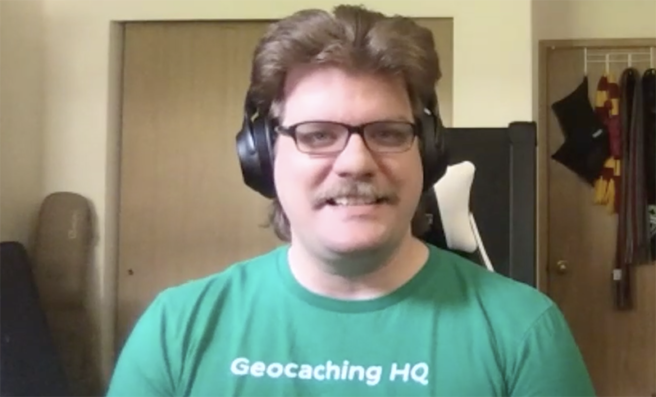
27:07 CR: Now before we go, I would be remiss if I didn’t ask, I don’t know if we’re gonna see the video of this conversation we are recording it, it may just be audio, but I would be remiss if I didn’t ask, normally at the office you’re wearing a hat. I don’t often see your… Is this hair always under that hat or is this pandemic hair?
27:29 DG: Little of both. Personal thing, I actually had psoriasis and it gets really bad on my scalp and what my hat was for was to keep my head safe and keep my hair short, so that I could take care of it really easily. I got on some new stuff and it has calmed the way the heck down and now my hair could be free again and this is just what it does. So, I showered this morning and then with hair, do what you will and it’s like, “Okay.” And then it does this. It stays up this high, it does all these things just on its own, and it’s actually a lot longer too. My headphones are covering up that there’s just a ton of it in the back, and this is what it does, and if we do the video and you really want something silly, I can show you a picture of me when I was 16, the first time I grew my hair long and you see this very skinny adolescent version of Daniel with hair past his shoulders.
28:27 CR: Oh my gosh, wow.
28:29 DG: Yeah, it’s wild. We’ll see if it keeps growing out. It’s a little bit pandemic hair, a little bit, see what happens if I… Now, I can grow my hair again just ’cause of the new medication I’m on, but yeah you’re right, it used to be hats every day.
28:45 CR: Well, if nothing else, we’ll do a screenshot and we’ll make sure it’s on the podcast page so people can, just coming from where I am, everybody knows what I look like. Kudos, hats off to you. This is very impressive.
[laughter]
29:00 DG: It wants to be a pompadour, never understood why.
29:02 CR: And I hope it continues once we’re back in the office, I think we’d all love to be able to see this every so often. [laughter] How are you doing otherwise? I’ve tried to ask everybody as we’ve done these conversations, just kinda how work is going and just life is going as we’re all making our adjustments here?
29:25 DG: Oh, it’s going really good. I have a good enough home office setup. So, working and getting all that is, it’s nice. I’m able to section that away from the rest of the house, so it doesn’t feel like I just work in the place I live. So that’s very helpful. Definitely a plus if you’re remote working friends. Work is going really well. Coming in the position for the mobile lead thing is kinda new but it’s also all the strengths that I have and I really enjoy that I get to flex all of those and work with the team and the team’s enthusiastic and doing great, which means I’m doing great so that’s… Everything is going quite well.
30:08 CR: Oh that’s great to hear and this has been a lot of fun. I’ve enjoyed hearing more about what you do, and I’m sure folks that met you at the event last year hope to see you again out there, and then hopefully folks in other areas get a chance to meet you down the line as well.
30:26 DG: Oh yeah. Every time we do one of those big trips, we try and do an event. So, if you’re ever seeing like a Lackeys on tour thing, I’m probably there. I’ve been to as many of them as I can, so keep an eye out for me there.
[music]
30:42 CR: So there you have it, that’s Daniel Gruici, the Mobile Engineering Lead at Geocaching HQ. If you have something you would like to hear us talk about on the podcast, you can send us an email. Our address is podcast@geocaching.com that is podcast@geocaching.com. We really love hearing your feedback and your suggestions, and if there’s something you would like to hear us cover, we’ll try to make that happen. Until next time, from me and from Daniel and all the Lackeys at Geocaching HQ, happy caching.