Check out Geocaching.com’s new look!
We’re always striving to make better tools for the geocaching community. The addition of the new geocache search and Hide a Geocache page gave us an opportunity to think about how players navigate Geocaching.com. We found that most players who visit the website want to either learn about geocaching, play the game, gear up, or connect with the global geocaching community. The new navigation should help guide you to find exactly what you’re looking for — and leave the hunting around for when you’re in the field!
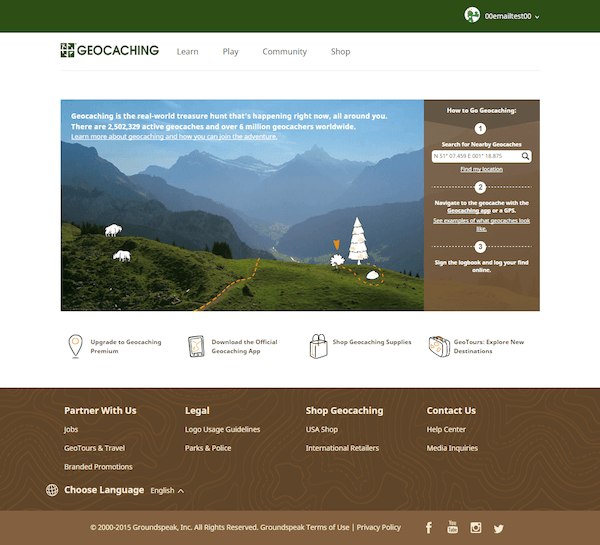
What’s new:
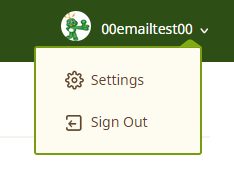 How do I access My Profile?
Click on your geocaching username or your profile image. This will take you to My Profile where you can access Lists, Geocaches, Trackable Items, Souvenirs, and more.
How do I access Account Settings?
Look for the gear icon in the drop down under your username.
Where can I see my membership status?
You can see your membership status listed in Account Settings or My Profile.
Why is the font different on the website?
You have good eyes! In the name of consistency, we updated the font to be the same across Geocaching.com.
Oh no! My geocaching scripts aren’t working anymore. When will you fix these?
These scripts are made and maintained by members of the geocaching community, not by Geocaching HQ. Occasionally, updates like this will stop them from working. Usually, the geocachers who own and maintain the scripts are quick to fix them. Thanks for being patient!
How do I find…?
Sometimes less is more. These pages did not make it into the new navigation but you can still find them on our website here:
- Guide to Buying a GPS Device
- Geocaching & Education
- Geocaching Brochures
- Geocaching Tools and Downloads
- Advertising with Us
- API Program
- Signal the Frog
- Geocaching in the News
- Benchmark Hunting
- Geocaching History
- Local Organizations (Note: Getting involved with a geocaching organization is one of the best ways to take your game to the next level. You can also learn more about organizations here.)


Thanks for the feedback! We’ve received similar suggestions from other players as well. I’ll be sure to pass this along to our design and development teams! Thanks! ~Paige
I like the idea of having it appear just for geocache owners! Good thinking. I’ll pass along this suggestion to our development team. Thanks!
Would it be possible to store somewhere (in user preferences or in some cookie at least) my preference about the used map? It always return to Mapquest OSM and from my point of view this map looks “ugly” and “OpenStreetMap Default” is much better and it also show more details…
I can go to map with two clicks. I would be please if it would be possible to get there in one click – but I can’t remember that it was possible to go to the map with just one click in the old version… Or it was?
It will take a while to get used to the “new layout”. I agree with the comments already made. More thought should have been given to this new layout. The most frustating change you have made is in “Find A Cache” “Search the millions of geocaches world wide”. How do we make a Pocket Querie from the list generated? This list is useless as we can not down load the results.
It seems cookies are not stored in IE11.
I know there is always grief with change–however… when the key aspect of what you doing on the website stops working something could be wrong. I typically load my caches to my GPS by clicking on the cache on the map and hovering to get to get the add to GPS window. The map is taking forever to load, and clicking on the cache to get the window only causes the the map to zoom (and reload). It took me about 10 minutes to load in 3 caches…