Just Follow the Favorite Points to the #OMGeocache
There’s a difference between finding a good geocache and finding a geocache that makes your jaw drop, racks up the Favorite Points, and inspires geocachers around the world. We call these #OMGeocaches.
Fortunately, finding these geocaches isn’t too hard. You can see some for yourself on the Geocaching Pinterest board with 197 Creative Geocache Hides. Every week, the blog features one of these geocaches as Geocache of the Week. And when you’re ready to find one in the wild, Geocaching Premium members can sort by Favorite Points on the new search page.
What’s the best #OMGeocache you’ve ever found? Post it on our Facebook page.
Folge einfach den Favoritenpunkten, um zu einem #OMGeocache zu gelangen.
Es gibt einen Unterschied dazwischen, einen guten Geocache zu finden und einen solchen, der Dir den Unterkiefer runterklappen lässt, bei dem die Favoritenpunkte nur so hochschnellen und der Geocacher auf der ganzen Welt inspiriert. Wir nennen solche Dosen #OMGeocaches.
Glücklicherweise ist es nicht allzu schwierig, diese zu finden. Einige davon stellen wir auf dem Geocaching-Pinterest-Board vor, auf dem Du Dir 194 kreative Geocache-Verstecke ansehen kannst. Im Blog wird außerdem wöchentlich einer davon als “Geocache der Woche” vorgestellt werden. Und wenn Du Lust hast, einen davon draußen in der Wildnis zu suchen, können Geocaching-Premium-Mitglieder die neue Suchfunktion nach Favoritenpunkten nutzen.
Was ist der beste #OMGeocache, den Du jemals gefunden hast? Poste etwas dazu auf unserer Facebook-Seite.
We’re excited to announce the launch of the new geocache search tool. It’s faster, easier to use and helps you find the exact adventure you want—and it’s all thanks to the geocaching community. We started the upgrade by asking geocachers what they wanted, then gave Geocaching Premium members a Sneak Peek at the new tool before launch.
Now the new search is ready for prime time. Take it for a spin by searching for Pi Day events and Mystery Caches near you so you can earn your Pi Day souvenirs on March 14.
And speaking of new upgrades to Geocaching.com, check out the newHide a Geocache page. It’s designed to be more helpful for new geocache hiders and streamlined for seasoned geocachers. See the new Hide a Geocache page.
We’re excited to announce the launch of the new geocache search tool. It’s faster, easier to use and helps you find the exact adventure you want—and it’s all thanks to the geocaching community. If you have questions not answered here, find us on Facebook or Twitter, or visit the Geocaching Help Center.
Be sure to test drive some of our favorite searches:
Find events near you.
Find the oldest geocaches near you.
Find the Mystery Caches you have solved, but not yet found.
Plan a geocache outing with your geocaching buddies.
Find the most Favorited geocaches in your area.
Find geocaches with the D/T combination that you need to complete your Fizzy Grid.
Continue the discussion on the forum. See FAQ below:
Why are some sorting and filtering options only available to Geocaching Premium members? Geocaching Premium member subscriptions help provide the resources to develop new tools like Search that create a more personalized geocaching experience. We recognize the contributions of our Premium members by allowing them exclusive access to tools that take geocaching beyond the everyday. Learn more about Geocaching Premium.
I want to export these awesome results to my phone and/or GPS! How do I do that? We’re with you there! This first few releases are about providing the best tool we can to help players find exactly the geocaches they want to find. Of course, we know that players will want to do cool things with the lists of geocaches the tool returns (like download them to a GPS, sync to the app, add to a list, etc). Our next releases will focus on those kind of actions.
How do I save my search results for easy access at a later time? At this time, the best way to do this is to bookmark the URL in your browser. Each search result contains a query string specific to your search filters. In other words, that URL will always bring you back to the results you’d like to save. And keep in mind, we are working on a saved search feature which should be available in the future.
Where is the filter for ____? Great question! Based on Pocket Query usage data and years of requests from the community, the filters in this first release of Search are our best attempt to satisfy the needs of most players. We will continue to listen to feedback and explore adding ways to filter the results as this page continues to evolve.
How do I search for geocaches in a region?
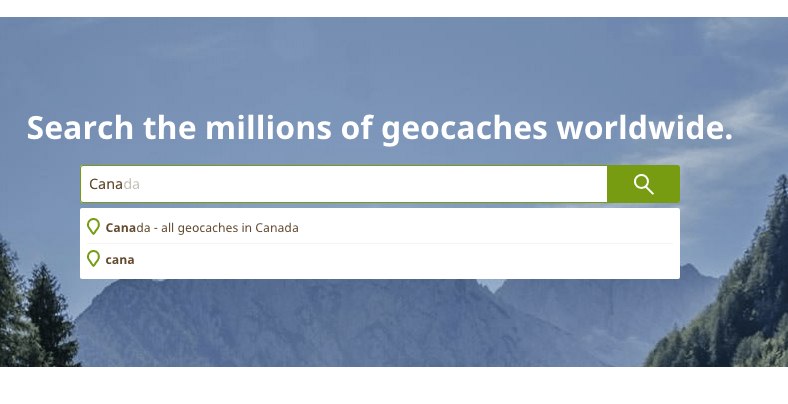
As of our March 7th, 2016 release, you can now search for all geocaches in a region by typing the location into the main search box and selecting “All geocaches in [location name]”.
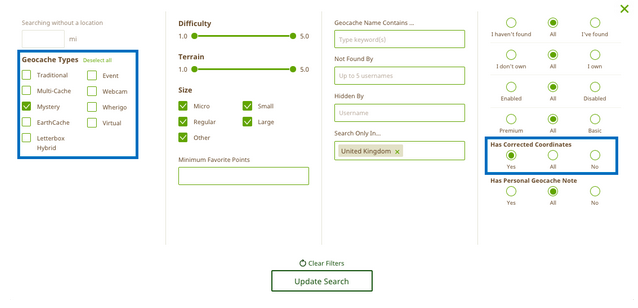
I heard a rumor that I can now search for the Mystery Caches that I have solved, but not yet found. How do I do this? When performing your search, check ‘Mystery Cache’, click ‘I Haven’t Found’ and toggle ‘Has Corrected Coordinates’ to ‘Yes’. This will then list the Mystery Caches you have solved. This feature is available to Geocaching Premium members.
Use Search to find Mystery Caches you’ve solved but have not yet earned a smiley for.
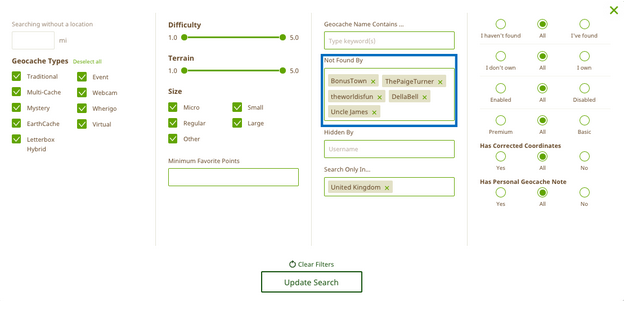
How has Search made planning geocache outings with my buddies easier? No need to repeat adventures! With the new Search tool, you can return only geocaches that you and all of your friends have not yet found. Geocaching Premium members have access to the ‘Not Found By’ filter which allows you to enter up to five usernames and will return a search of geocaches not found by all of the usernames listed.
Plan geocache outings with your friends!
How do I search for the most favorited geocaches in my area? Easy! Enter the city name and country name (or an address), the difficulty/terrain (D/T) rating, and the minimum number of Favorite Points of the geocaches you want to find.
Search for only the best geocaches.
How can I find the geocaches located in my state that I need to complete a challenge like the Fizzy Grid?
First, search for all of the geocaches in your state using the main search box (e.g. “all geocaches in Washington”). After the results are returned, select “Add Filters” to add in the criteria of the geocaches you want to find.
How do I find the newest caches in a state?
First, search for all of the geocaches in your state using the main search box (e.g. “all geocaches in Washington”). After the results are returned, click on “Placed On” to sort by dates places. If you click once, the list will show you the most recently published caches first (almost all will be event caches).
How do I search for caches “Found By” another geocacher? 1. Visit the Profile page of the other player (you can use the Find a User page here)
2. Click on the “Geocaches” tab on their profile
3. Under “Geocaches Found”, click on “All Geocache Finds”. The resulting list will show all geocaches found by that user.
Why can I no longer search using the ‘Cache starts with’ feature? We have replaced ‘Cache Starts With’ with ‘Geocache Name Contains…’ because it allows you to search the entire name of the geocache rather than just the beginning. Geocaching Premium members can also sort the search results by geocache name alphabetically which is a great for when you want to find a geocache that starts with a certain word(s).
I want to search by a geocache name, but it’s not working. Help!
To search by a geocache name, first enter a location in the main search box. You can either enter a location to center your search (e.g. “Seattle”) or you can choose to do an “origin-less” search by not entering a specific location. Once you’ve entered a location, click “Add Filters” and add a keyword to the “Geocache Name Contains…:” filter.
I’d like to use the old search No problem! We’re keeping it around a bit longer.
And you thought Mega-Events were huge! Giga-Events are the largest event type and are attended by over 5,000 geocachers. For those who attend, you’ll earn the rare Giga icon in your statistics, plus you’ll get the opportunity to meet tons of geocachers from around the world.